
 Posts
Posts


Two ways to use AI as an Education Administrator
There’s a lot of hype about AI, and for good reason. In this article I lay out two use cases for Generative AI that have changed the way I work. For context, I serve as head of a team of more than a dozen educators and am privileged to help them plan their units of study, it’s a process of curriculum design. Secondarily and simultaneously a not insignificant piece of the job involves collecting and analyzing student data, with the intended goal of being able to eventually review the outcomes of student learning to glean lessons for next steps, as well as judge the general health and well being of the program. All of these tasks are being made exponentially more efficient with the use of generative AI, coupled with careful prompting and planning.
Take for example the lesson planning process. Once upon a time teachers sat down with a template. This hand written document then informed their carefully typed or hand written worksheets, designed to guide the learner. We’ve developed since then and today we use Word or Google Docs, plotting out the curriculum page by page. Today, many teachers use PowerPoint and Canva to create engaging slideshows that partially replaced the black on white learner materials. This process is fundamental to the planning and eventual implementation of the materials for an engaging lesson. It’s also terribly time consuming and repetitive. The perfect field for generative AI.
Whether you use Google (Gemini and Nano-Banana) or OpenAI (with ChatGPT) the work of finding an image on Google Search, laying out the image next to a description thereof, and imagining how things might be before hitting the blank page saves time. Want an image? Request a 4x4 grid of high quality cartoon style images that are arranged by the topics you’ve already agreed on. It’s a step change in how much can be produced, and how easily the data can be interpreted. When prompted properly, and fed the data, AI can be a partner to school administrators by making the production process painless and the data analysis lift lighter.
Here’s a use case: three times a year we assess the student reading using an assessment tool. In short, it tells us how much a student reads (in total correct words read in a minute) and how quickly (in terms of correctly read words per minute). The data is collected three times, and the median number is used for data analysis. These data points are then compared with standards / expected outcomes in 2nd—4th Grades. Proctoring this assessment is an intense workload, with teachers devoting time in order to hear each student read to them. It’s a logistical investment and valuable time is spent ensuring that each student is being “pulled” for a 1-1 check-in, reading in defined intervals (one minute on the clock using grade appropriate texts). That’s before the the data is manually inputted to a LMS (learning management system) which then produces, upon request, a variety of graphs and tables. Next comes the crucially important, heavy administrative lift: Combing through all the data.
Good data analysis requires a good eye and team work, taking care to notice trends in grade bands, comparing results from one class to the next, year-to-year and longitudinally, and the while trying to make the best informed decision on what to do next in the cycle of assessment that leads to informed instructional choices.
The hard part, until now, for me at least, was making sense of all the data. Here are the results of several hundred students. Where to begin? How can we make the assessment work for us after all the effort involved in making the assessment happen in the first place?So I fed the PDF’ed versions of all the class graphs and charts into my personal favorite AI, Gemini Pro, and told it to go to work. What it was able to do for me, I don’t think I could have done for myself in 5 hours, and that was my Aha moment. Any school admin that isn’t using AI is missing out on a powerful partner, great at sifting through piles of data and producing rough drafts of what to do with it. I asked Gemini to review the data, and propose: how to divide the students into three instructional groups by ability and then propose a series of activities appropriate for each newly formed group over the course of a week. Once we agreed on the first two steps, we even designed those activities, creating high quality visually appealing educationally and developmentally appropriate materials for instruction that support the plan, minute by minute. That’s powerful partnership that is available at the click of a button.
Other than the cold dry numbers of assessments, Generative AI can make you, yes, you, the designer of any range of educational material. Who used to design infographics on ancient times? Textbook designers. What if the book hadn’t been written? Or, as in the case of Modern Hebrew, won’t be written by a major publisher as explained to my colleague in the field, since the demand just isn’t there from a numbers (total student base) perspective. Spanish — check. Plenty of materials. Math for 4th Grade — dozens of textbooks, teachers guides, workbooks and standardized additional resources, think accompanying PowerPoints.
For language teachers, and specifically Hebrew language teachers, the list is much shorter. Take for example the offerings of CET, the Center for Educational Technologies. Perhaps the best producer of Hebrew language workbooks developed for elementary students. The vast majority of their offerings are designed for an Israeli audience, and not English speakers learning Hebrew in America. Until this year they hadn’t released a single program for American students in the early elementary grades. Zero. And even now, that program is hundreds of dollars per class, and involves a handing over of not only significant funds, but also power in what will be taught and how. The song the publisher picked gets played, analyzed and sung, the one your team would like teach is the price.
Enter AI. Point in case: The fourth grade team
is in a mode of constant development. The work flow often revolves around reviewing and refreshing the extant curricular resources (many of which were developed through grants dozens of years ago) such as Chaverim B’Ivrit (Friends in Hebrew) program which is still in wide use despite its age and limited language production and minimal further development and updating. The teachers work their magic, thinking of what they wish they had — visual representations to help their students make sense of the language. It used to be a painful
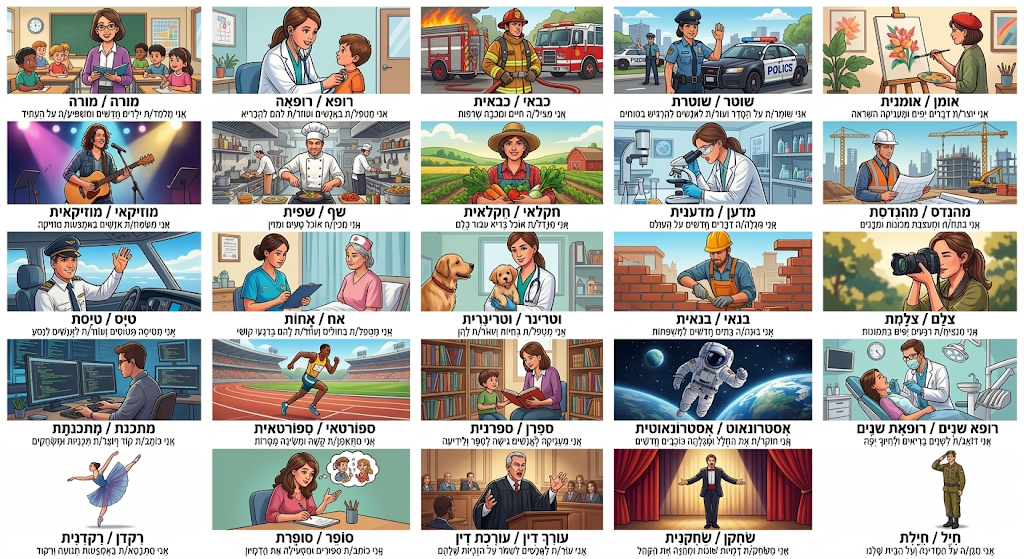
process of scouring the internet for images, low quality clip art and Word graphics. Not anymore. Here’s what we did instead: We employed the brains and brawn of Google Gemini in the design of the unit from soup to nuts.
We use Gemini’s chat bot to explicate the lesson’s many facets. Step one: Tell it what you’re doing. In my case, I describe the task as designing a new unit of study that centered on the topic of different careers, בעלי מקצועות . The inspiration for the mini unit, was the desire to help students describe their world — the adults in it (parents and trusted adults) as well as their own hopes and dreams. Desired outcome: Help students learn to say what they want to be when they grow up, while teaching them about jobs, actions and descriptions. Gemini understood. With gentle prompting, a cascade of Hebrew gushed forward: lists of jobs, descriptions of their roles, comprehension activities based on those newly generated texts, and importantly: all aligned to ACTFL (American Council on the Teaching of Foreign Languages) standards. The work product was clean, met the goals, it’s theirs, and it looks great. I mean professional grade, flawlessly aligned visually and pedagogically and it took: thirty seconds. Here’s a cool trick: Once you’ve done all that work; the fun has just begun. Type: “Make another”. Type: “Review for errors and make it better.” Run that a few times. What is produced at the end of this creative process is the combined humanpower of ingenuity married with the machine power of data crunching.
One more example (below). With credit to the Leittner group in Israel, and the Negba organization, here is a language sheet designed for Israelis, native language learners. With a few prompts and permission, the black on white sentences became visually aided, appealing and rich. These sentences can then be manipulated into different language tasks by printing out the illustrations. Matching the text to the illustration, describing the illustrations (with and without a word bank), telling the story the picture has to tell — these are child friendly and grade / language appropriate tasks for all early childhood learners and language learners more generally.

 .
.
Want to discuss? Reach out to me directly at mickfine@gmail.com
Enjoy the article? Share online and let me know.
Thanks for reading,
-Mick
Rabbi Mick Fine
Director of Lower School Hebrew and Judaic Studies
The Leffell School; White Plains, New York

This is a very important article because it presents a balanced, practical, and responsible approach to the use of artificial intelligence in education. I especially appreciated the emphasis on the idea that AI does not replace the educator, but rather strengthens the educator’s work by saving time, supporting deeper data analysis, and enabling the creation of more precise and differentiated materials for students.
ReplyDeleteAs someone who works in education, I also connected deeply with the point about the gap between the real needs of language teachers, particularly Hebrew teachers, and the limited availability of high quality, well adapted instructional materials. This is precisely where the potential of these tools becomes especially meaningful, not only in improving efficiency, but also in expanding pedagogical possibilities in thoughtful and creative ways.
Thank you for sharing such a thoughtful, honest, and highly relevant piece. It encourages exactly the kind of conversation educators need today, not whether technology should be used, but how it can be used wisely, intentionally, and in service of meaningful teaching and learning.
I really enjoyed your post. It felt very practical.
ReplyDeleteAs a Hebrew teacher, I connected to your ideas about adjusting materials, saving time and using AI carefully.
Thanks for sharing!
Yael Bronstein